Open the Agent’s Contact form by going to Contacts --> Find Contacts
- Search and open the agent in question
- Click on the Accounting tab
- Click on the Payment Information tab
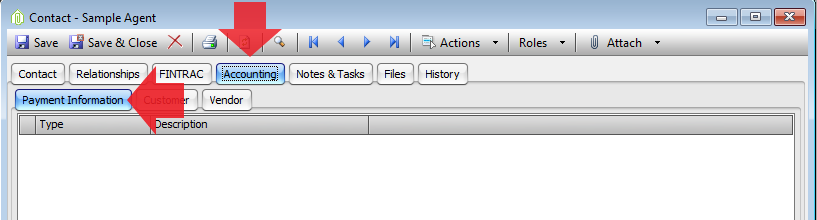
- Click on the plus button at the bottom of the Grid

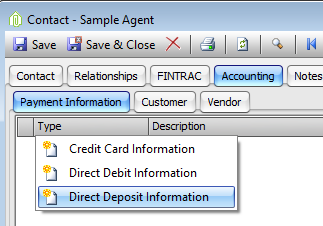
- Choose Direct Deposit Information
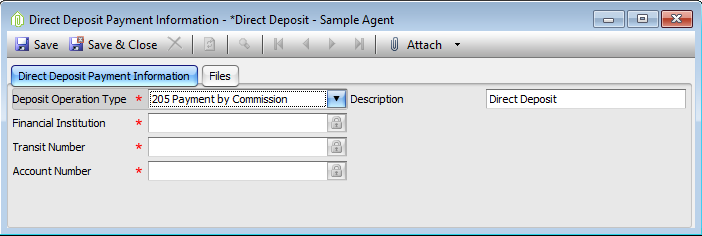
- Enter the following information.
- Deposit Operation Type = 205 Payment By Commission
- Description = Direct Deposit - Payment by Commission
- Financial Institution – Agents info provided by a void cheque or something similar
- Transit Number - Agents info provided by a void cheque or something similar
- Account Number - Agents info provided by a void cheque or something similar
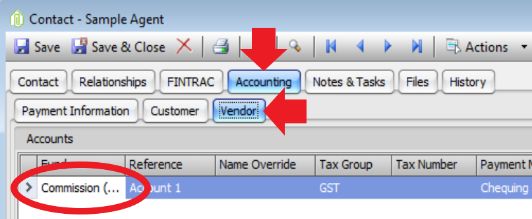
- Click on the Vendor tab
- If you have 3 funds
- Open the Commission Fund Vendor Account by double clicking on the first column of the row
- If you have 2 funds
- Open the General/Operating Fund Vendor Account by double clicking on the first column of the row
- Change the Default Payment Method to your Direct Deposit or EFT payment method
- Change the Direct Deposit field to Direct Deposit - Payment by Commission
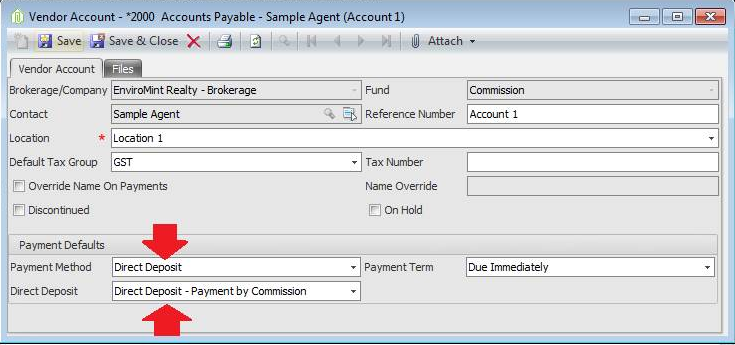
- Save & Close the Vendor Account form
Comments