Batch Deal Payout
Payout all deals as you normally would through the Deal Payout and Agent Payout Button on the Deal Menu
When the Pay Vendors Screen opens after the Agent Deductions have been processes, the payment method that must be selected for Agents Receiving Direct Deposit must be Direct Deposit, and the hit create payments.
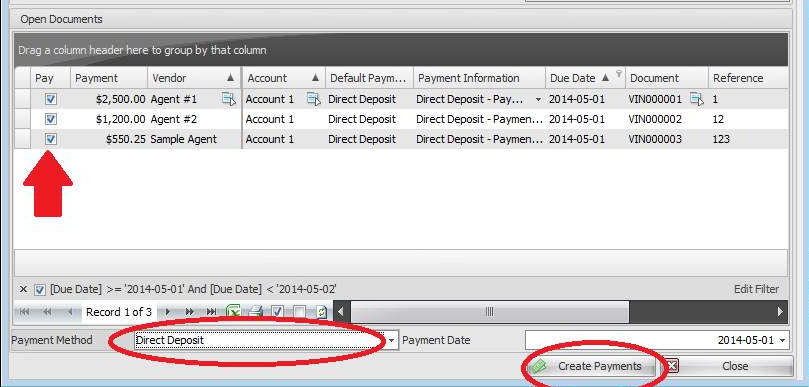
Once Payments are created, the Bank Deposit/Withdrawal Form automatically opens up.
Fill in all Fields and Select all the agents you wish to pay Direct Deposit.
Fund= Commission or General
Mode = Withdrawal – Direct Deposit
Payment Method = Direct Deposit
Clearing account = Pending EFT
Bank Account = Your Bank account
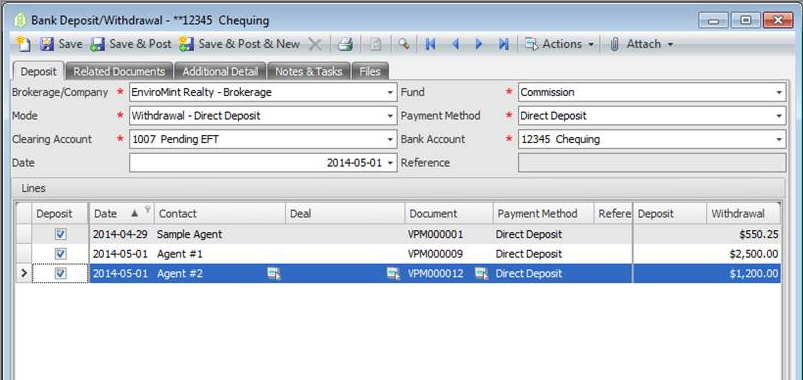
Once Satisfied that all agents are selected and amounts are correct hit Save & Post
From the Actions button Choose Export File

Save the File to your Hard Drive.
And then upload it to the bank through their direct deposit file upload screen.
Comments