Adding items to checklists is a 2 step process:
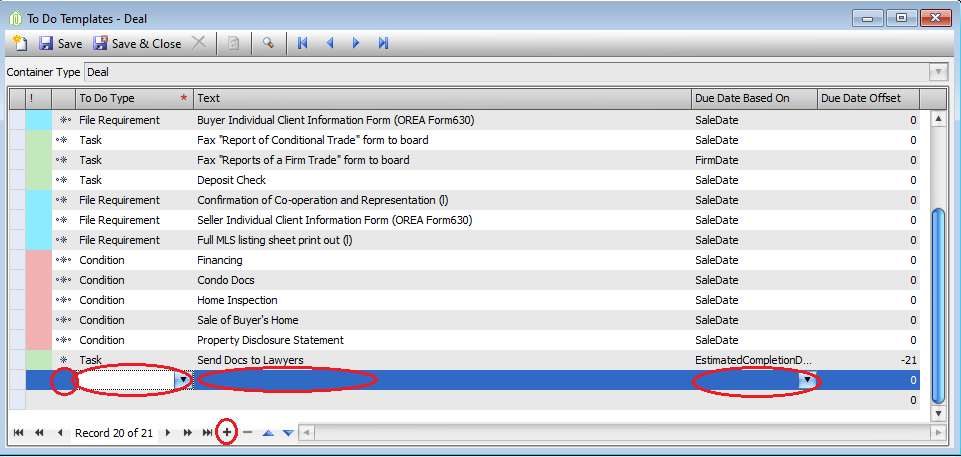
1. Adding the item to the To Do Templates
- Setup --> Deals --> To Do Templates
- Choose Container Type: Listing OR Deal
- Tab Over
- Click the + at the bottom to add a new line
- You will select the To Do Type = Condition(for deals only), File Requirement or Task
- Once the To Do Type is selected, you will need to adjust the security if your agents need to be able to view this item, double click on the star to the left of the To Do Type
- Name the Item in the Text column
- Select a Due Date Based On
- You will select the To Do Type = Condition(for deals only), File Requirement or Task
- Save & Close
- Redo these steps for each new item needed
- Choose Container Type: Listing OR Deal
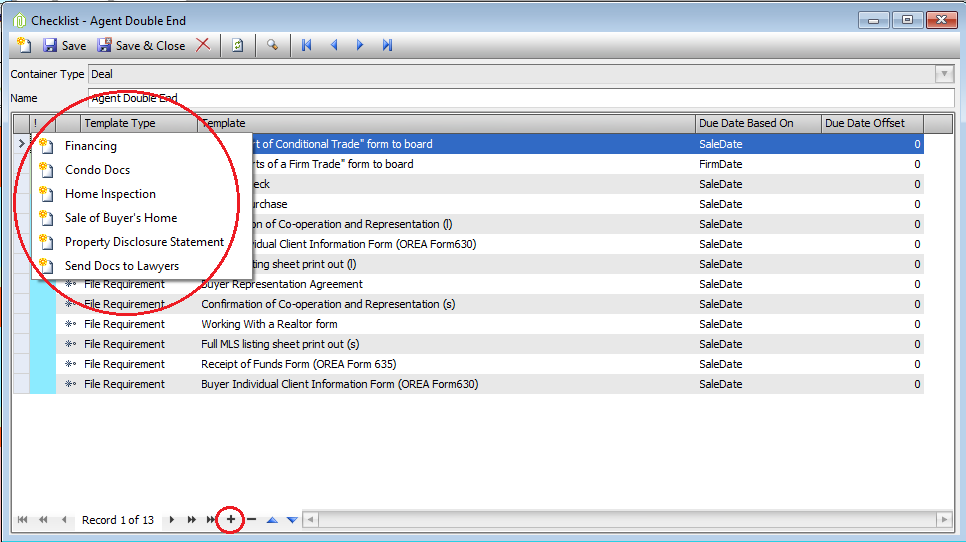
2. Adding the created items to appropriate checklists.
- Setup --> Deals --> Checklists
- Click the Search Toggle(Finder) to see all checklists
- Double click the one you need to add the new item too
- Click the + at the bottom, a list of any items not in the checklist will show, click the new item you just created to add to the checklist
- Save & Close
- Click the Search Toggle(Finder) to see all checklists
Comments