
1. Open the report in Grid View.

2. Click the Printer icon located at the bottom of the screen.
When the report opens in a Print Preview
- Click the Export file button
Choose Export to CSV file.
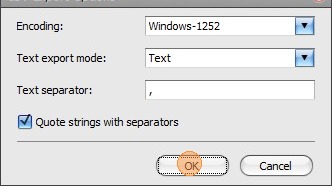
3. Click OK to the pop up window.

4. Choose where to save the file and click Save.
When prompted:
- Click Yes to open the file immediately.
- Click No if you prefer not to open it right away.
Comments